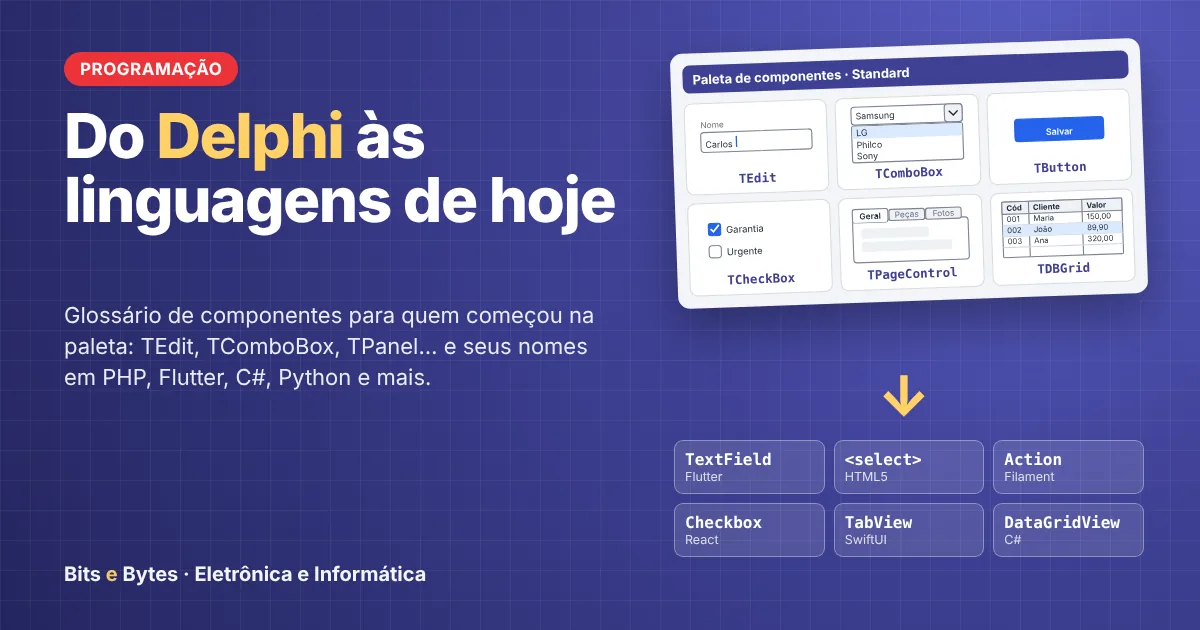
From Delphi to Today's Programming Languages: A Glossary for Those Who Started with the Component Palette
If you learned to program by dragging a TEdit and a TButton onto a form, this article is for you. We’ve put together a glossary that translates the names from the Delphi palette into the most commonly used languages today: HTML5, PHP, React, Flutter, C#, Python, Android, and iOS.
Those Who Got Their Start with the Component Palette
In 1995, Delphi changed the lives of many programmers. All you had to do was drag a TEdit, a TComboBox, and a TButton onto the form, double-click the button, and write the code for the OnClick event. In just a few minutes, you had a working registration screen, connected to the database via a TDataSource and a TDBGrid.
Here at Bits and Bytes, we experienced that era firsthand. Thirty years later, we open the documentation for a modern framework and see TextField, Scaffold, <select>, QLineEdit, and Picker. The reasoning is the same as always; what has changed is the vocabulary.
Why Have the Names Changed?
The names have changed because the environment where the program runs has changed. Before, it was a window in Windows; today, it’s a browser, a cell phone, or a server that only returns HTML. Three changes explain almost the entire difference:
The web has no predefined form layout. The screen is an HTML document built with tags, and the visual style comes from CSS (Bootstrap, Tailwind).
The layout has become a stack. Instead of Left and Top, controls are stacked in rows and columns, like panels with Align = alTop inside a panel with alClient.
State drives the screen. In React, Flutter, and SwiftUI, no one writes
Edit1.Text := 'Carlos'. You change a variable, and the screen redraws itself.
The most commonly used components, side by side
The table lists the 16 components that appear most frequently in a management system. The complete glossary in PDF format includes 40 visual components and also covers React, Android, and iOS.
Delphi | HTML5 | PHP (Laravel/Filament) | Flutter | C# WinForms | Python (PySide6) |
|---|---|---|---|---|---|
TForm |
| Page / Resource | Scaffold | Form | QMainWindow |
TLabel |
| TextEntry | Text | Label | QLabel |
TEdit |
| TextInput | TextField | TextBox | QLineEdit |
TMaskEdit |
| TextInput->mask() | TextField + inputFormatters | MaskedTextBox | QLineEdit.setInputMask() |
TMemo |
| Textarea | TextField(maxLines: null) | TextBox (Multiline) | QPlainTextEdit |
TButton |
| Action | ElevatedButton | Button | QPushButton |
TCheckBox |
| Checkbox | Checkbox | CheckBox | QCheckBox |
TRadioGroup |
| Radio | RadioGroup | GroupBox + RadioButton | QButtonGroup |
TComboBox |
| Select | DropdownButton | ComboBox | QComboBox |
TListBox |
| Select->multiple() | ListView | ListBox | QListWidget |
TPanel |
| Grid / Group | Container | Panel | QFrame |
TGroupBox |
| Section / Fieldset | Card | GroupBox | QGroupBox |
TPageControl | Bootstrap .nav-tabs | Tabs | TabBar + TabBarView | TabControl | QTabWidget |
TDateTimePicker |
| DatePicker | showDatePicker() | DateTimePicker | QDateEdit |
TDBGrid |
| Table + TextColumn | DataTable | DataGridView | QTableView |
ShowMessage |
| Notification::make() | AlertDialog | MessageBox.Show() | QMessageBox |
From the Object Inspector to the code
The component’s name changes very little; what changes most is how you configure it. In Delphi, Caption, Visible, and OnClick were in the Object Inspector. Today, they have become attributes, parameters, or chained methods.
Delphi | HTML5 / JavaScript | PHP (Filament) | Flutter | C# WinForms |
|---|---|---|---|---|
Caption | tag text | ->label('Name') | Text('Name') | Text |
Edit1.Text (read) |
| $get('name') | controller.text | textBox1.Text |
Align | Flexbox / CSS Grid | Grid->columns(3) | Column / Row / Expanded | Dock |
Visible | hidden attribute | ->visible() / ->hidden() | Visibility / if | Visible |
Enabled | disabled attribute | ->disabled() | onPressed: null | Enabled |
Hint | title attribute | ->tooltip() | Tooltip | ToolTip |
OnClick | onclick | Action->action(fn () => …) | onPressed | Click |
OnChange | input/change event | ->live()->afterStateUpdated() | onChanged | TextChanged |
OnCreate | DOMContentLoaded | mount() | initState() | Load |
TabOrder | tabindex | field order | FocusTraversalOrder | TabIndex |
PHP and Filament: the Delphi of the Web
Pure PHP has no visual components: it generates the HTML that the browser displays. What gives PHP a true palette of components is Filament, which runs on Laravel and Livewire. For those coming from Delphi, it’s the most familiar environment on the web.
Here’s a required CPF field, with a mask and hint, configured in a single chained line:
TextInput::make('cpf')
    ->label('CPF')
    ->mask('999.999.999-99')
    ->required()
    ->tooltip('Somente números');
It’s the same as dropping a TMaskEdit onto the form and filling in the EditMask, Hint, and validation in the Object Inspector. A Filament Resource plays the role of the trio TDataSource + TDBGrid + edit form: it lists, adds, and updates records in a table, linked to the database Model. To access the database directly, PDO serves the same purpose as FireDAC and includes drivers for MySQL and Firebird.
Tips for the Transition
Start with what resembles Delphi. C# was created by Anders Hejlsberg, the same architect behind Delphi, and WinForms retains the model of dragging components and programming events. Lazarus (Free Pascal) even preserves the VCL names.
On the web, go with Filament. Fields are configured just like in the Object Inspector, and a Resource provides the complete data structure.
On mobile, think in terms of state. In Flutter, TEdit becomes TextField, and the value is held in a TextEditingController. The screen follows the variables, not the other way around.
Use FireMonkey as a bridge. Modern Delphi compiles to Android and iOS using FMX, which retains TEdit, TLabel, and TButton.
Download the complete glossary
The illustrated PDF is 7 pages long and covers 40 visual components, 10 non-visual components, and 16 properties and events across eight platforms: HTML5/Bootstrap, PHP (Laravel/Filament), React, Flutter, C#, Python, Android, and iOS. [LINK TO DOWNLOAD THE PDF]
Bits e Bytes develops custom systems and modernizes legacy Delphi applications for the web and mobile, without compromising the business rules that have worked for years. If your system still runs on a TForm, talk to us.
What did you think?
Comments
Comments are moderated before being published.